

Seat a walk-in
Get an unbooked party to the best open table in two taps.
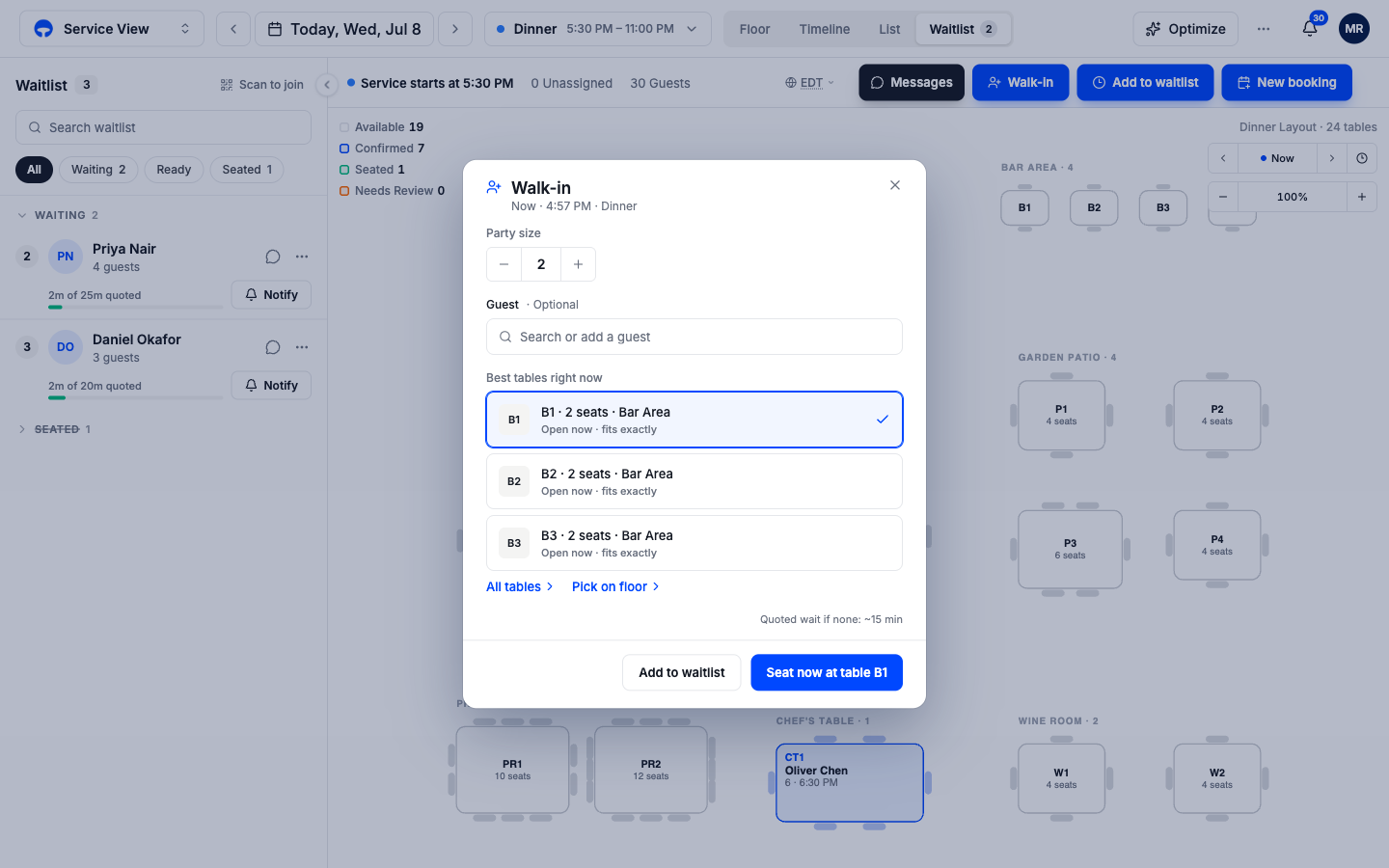
A walk-in is a party at the door with no booking. The Walk-in window finds the best open tables for their size right now, so the whole exchange is party size, table, seated. This takes seconds, which is the point; the guest is standing in front of you.
Seat the party
Click Walk-in, or tap an empty table
Walk-in sits in the quick-action row during service. Tapping an empty table on the Floor tab opens the same window with that table already chosen.
Set the party size
Use the stepper at the top. The table suggestions below update as the number changes.
Pick a table
Best tables right now lists the top open tables that fit, with why, "Open now · fits exactly". Tap one and click Seat now at table B1. If none of the three suit, All tables lists every open table by area, and Pick on floor lets you tap the table on the map instead.
The party is seated
The table turns green on the floor and the party shows in the Seated group of the guest rail.
Add the guest's name when you have it
The guest field is optional. Leave it empty and the booking is recorded as a walk-in guest; the night's covers still count. A named guest builds visit history for your regulars, and a phone number lets you text them later from Messages.
When no table is free
The same window quotes the current wait, "Quoted wait if none: ~15 min", and the Add to waitlist button hands the party to the waitlist without retyping anything.